

Introduction
In this article we will learn Find multiple Ways to User Account Info and Login Details in Linux
Table of Contents
Why do we need user account information?
Before addressing the question of what, let us discuss why we need user account information. Well, we all know that Linux is a multiuser platform. Therefore, we must manage these users properly to keep the system productive, organized, and functional.
The system administrator must know all the users using the system to manage them and their permissions. Therefore, tracking all the users is a significant job. We can use multiple tools, which we will look at in depth in this article. We also know that everything in Linux is a file, and all of the information about users is contained in the “/etc/passwd” file. The respective hash passwords are present in the “/etc/shadow” file.
In a nutshell, it is an essential job of system administrators to monitor the users in the system. To do this task, we have many monitoring commands like d, group, whoami, finger, getent, grep, lslogins, users, who, lastb, lastlog, w, and more.
What is the user account information?
The user account information contains various information like the user name, the time of login, last time of login, account expiry date, password expiry date, idle time, login time, email address, plan, project, pgpkey, and countless more information! It only depends on what you are capable of asking Linux.
Let us look at some user information look-up commands:
This article will demonstrate multiple helpful methods that can be used to locate information regarding users on a Linux system. In this section, we will cover commands that can be used to retrieve information on a user’s account, show login data, and find out what people are doing on the system.
The commands that allow us to find a user’s account information will be covered first, followed by an explanation of the commands that allow us to access login information.
Follow the below steps to Find multiple Ways to User Account Info and Login Details in Linux
Ways to view User Account Info
id Command
id is a straightforward command line application that displays accurate and useful user and group IDs in the format described below.
# id befriend 
groups Command
This is an example of how the groups command may be used to display all of the groups to which a user belongs.
# groups befriend
getent Command
The getent tool is a command line programme that can retrieve entries from Name Service Switch (NSS) libraries that are stored in a particular system database.
Follow the steps below using the passwd database and the username to obtain information about a user’s account.
# getent passwd befriend
grep Command
grep command is a strong example looking through device available on the vast majority Linux frameworks. You can utilize it to find data about a particular client from the framework accounts record:/etc/passwd as displayed underneath.
# grep -i befriend /etc/passwd 
lslogins Command
lslogins command shows data about known users in the framework, the – u flag just shows user accounts.
# lslogins -u 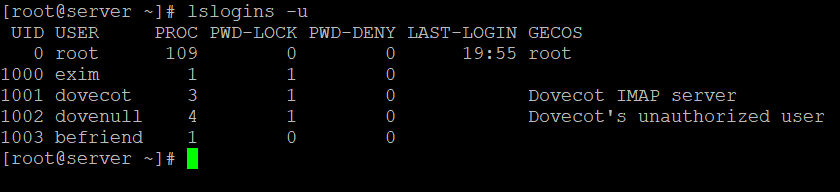
users Command
The users command displays the usernames of any and all users who are currently logged on to the system in this format.
# users 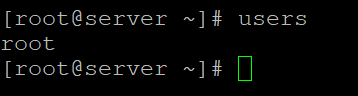
who Command
The who command is used to display a list of users who are currently logged on to the system, along with the terminals from which they are connecting.
# who -u 
w Command
The w command displays all users that are currently logged on to the system as well as the tasks that they are performing.
# w 
last or lastb commands
The output of the last and lastb commands is a list of the most recently logged-in users on the system.
# last or
# last -a 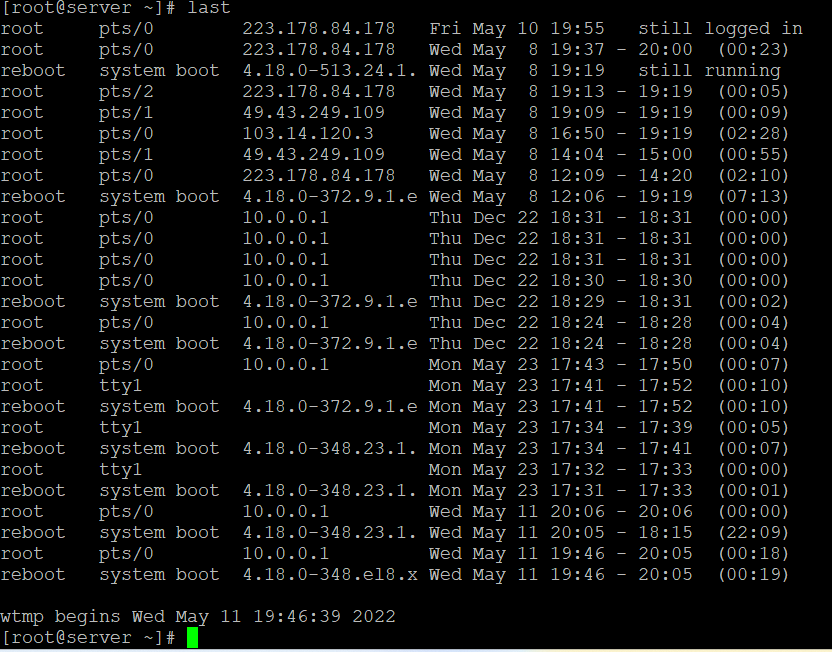
Use the -p option in the following way to display a list of all the users who were online at a particular time and date.
# last -ap now 
lastlog Command
The lastlog command can be used to determine the particulars of a recent login for all users or for a specific user, as seen below:
# lastlog
# lastlog -u username 
On a Linux computer, we have discussed a variety of methods that can be used to locate information about users and login data.
This article shows several ways to find Linux user information. We’ll discuss commands to get user account information, login data, and system activity in this section.
I really hope that you’ve got all of those steps down to Find multiple Ways to User Account Info and Login Details in Linux